
Your price and your next opening, right on your website.
Customers see what the job costs and when you can do it, then book and save a card, even while you’re busy on another job. Sorvius adds this to the site you have, or gives you a booking page at yourbusiness.sorvius.com if you don’t have one.
No credit card required. Free until your first booking, and we’ll email you when it’s time to add one. Cancel anytime.
- Price in seconds
- Real open times
- No fee on your payments
- Free until your first booking
Works with Wix, Squarespace, Framer, WordPress, and link-in-bio, or with no website at all.
Same customer, two websites
It's 9 PM, and someone wants to book you this week
Your website today
- They want to know what it costs and when you can come
- Your site says "Call for a free quote"
- They leave a message and wait to hear back
- The next business's site shows a price and an open time
They booked someone else.
Your website with Sorvius
- They pick the service and answer a couple of questions
- Your price comes up right away
- They choose from your open times
- They save a card, and the job is on your calendar in the morning
Booked Thursday, 9:00 AM · $240
Try it, no signup needed
Pick your trade. This is the real widget.
Cleaning prices on bedrooms, bathrooms and home size. Lawncare prices by lot size. Pressure washing prices by surface and area. Choose your trade and try the booking flow your customers would see. Nothing gets booked and no account is needed.
See how it works for your trade: House cleaning · Lawn care
That price came straight from a rate card, with no AI, measuring or callback involved. The demo stops before the card step; on your site that’s where the customer saves a card, and it’s your branding throughout.
How it works
From visitor to booked job in one minute
Customer picks a service and gets a price
They choose what they need and enter the details (size, hours, or a flat rate). Your rate card returns an instant price without a callback or guesswork.
They pick a time and save a card
One-time or recurring. They choose a slot and save a card on file through your own Stripe account.
The job lands in your dashboard
You get the booking and a ready-made schedule, plus automatic confirmations and reminders. You just show up and do the work.
Why speed wins
Whoever answers first wins.
7×
more likely to reach the customer when you reply within an hour
40+ hrs
the average business takes to reply to a new lead
Price in seconds
the time a Sorvius customer waits for your quote
A customer on your site right now won’t wait that long. An instant quote wins the job before your competitor sees the lead.
Sources: The Short Life of Online Sales Leads, Harvard Business Review (2011).
Your contact form is costing you jobs
A contact form doesn’t book anything. Someone fills it out, then waits. You see it hours later, play phone tag, drive out to quote, and text a price that night. Every step is a chance for that customer to hire the next business instead. A booking tool closes the loop while they’re still on your page.
Keep your contact form. Just add the fast lane.
You don’t have to remove a thing. Add a “Get an instant quote & book” button for customers ready to hire, and leave your contact form for questions. The button books the customers who are ready, and the form catches everyone else.
Features
Everything you need to book more jobs
Unlimited bookings
Neither plan caps how many bookings you take.
Instant quotes, 24/7
Capture leads while competitors play phone tag.
Card on file kills no-shows
Save the customer’s card at booking to lock the job in.
Recurring revenue on autopilot
Weekly, biweekly, and seasonal jobs schedule themselves.
Extras sold before you arrive
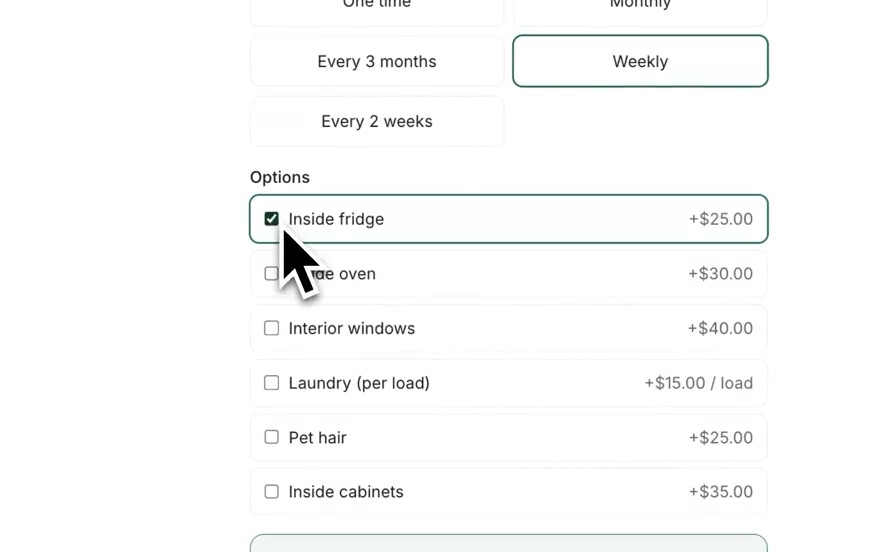
Customers tick the add-ons they want, each at your price, while they book.
Every service, every season
Lawn, cleaning, snow, pressure washing and other services, all from one login.
No more double-booking
A calendar for solo or team; full slots disappear automatically.
Paste and go
One line of code on any site. Live in minutes.
Your money, your Stripe
Payments go straight to your account. We never hold your cash.
Built for small service businesses
Sorvius handles one part of your business: turning website visitors into paid, scheduled jobs, whether you’re a solo operator or a small crew. Pricing is per business rather than per truck, and most businesses are live in about ten minutes.

I built Sorvius after trying to hire a lawn care company and finding no prices and no open times, only “call for a quote.” With Sorvius, customers see your full price and your openings and book on the spot, so you get the job while they’re ready to pay.
Jeremy, founder · read why I built it
It’s built and run by one person, for one-person businesses, so it’s shaped around how a solo operator works day to day. Got a question before you sign up? Email me directly and I’ll answer it myself.
Pricing
One flat price. Every payment is yours.
Two plans with unlimited bookings, no fee on your customers’ payments and no charge per booking. Free until your first booking. No card needed to start. No setup fees or contracts, and you can cancel anytime.
Standard
$39 per month
For getting booked online.
- Unlimited bookings
- Instant quotes from your rate card
- Priced extras and add-on services at booking
- Online booking + card on file (your own Stripe)
- Recurring scheduling, calendar & manual jobs
- Customer portal to reschedule, skip or update their card
- Automated email & SMS reminders
- Discount codes, booking questions, tips & sales tax
- Calendar feed for Google, Apple or Outlook
- Customers, notes, import & export
- Your own booking page at yourbusiness.sorvius.com
- Your logo on the booking widget
No credit card required. Free until your first booking, and we’ll email you when it’s time to add one. Cancel anytime.
Pro
Most popular$79 per month
For booking more customers and keeping them.
- Everything in Standard, plus:
- Take a deposit before the first visit
- Automatic follow-up with visitors who got a price but didn’t book
- Automatic Google review requests after completed visits
- 3 team members included
- Crew see only their own jobs and get a text of each day’s jobs
- HubSpot sync, webhooks & developer API
- Priority support
Coming soon to Pro
- soon Two-way texting, with customer replies in your dashboard
No credit card required. Free until your first booking, and we’ll email you when it’s time to add one. Cancel anytime.
Payments are powered by Stripe, and money goes straight to your own Stripe account. Sorvius takes no fee on your customers’ payments. You pay only Stripe’s standard processing fees.
FAQ
Questions, answered
How do I add online booking to my website?
Paste one line of code where you want the button. It works on Wix, Squarespace, Framer, WordPress, and most site builders, and you don’t need a developer. If you don’t have a site, you get your own booking page at yourbusiness.sorvius.com to share anywhere, including your link-in-bio.
What kinds of businesses is Sorvius for?
Any local service you can put a price on, including lawn care, house cleaning, snow removal, pressure washing, landscaping, pool care, handyman work, and pet services. If customers ask “how much and when,” Sorvius books it.
I already have a contact form. Why do I need this?
A contact form collects names; Sorvius collects booked, paid jobs. Keep your form for questions and add an instant-quote button for people ready to hire. They get your price in zero minutes instead of hours, and you lock in the job before they shop around.
How does instant pricing work?
No AI guesswork. You set a rate card (by size, by the hour, by unit, or a flat rate), and customers get a price from it. You confirm the final price before the first visit.
How do payments work?
You connect your own Stripe account in a couple of clicks. Customers pay you directly, and Stripe deposits the money to your bank on its normal schedule. Sorvius takes no fee on your payments: you pay only Stripe’s standard processing fees, and Sorvius never holds your funds. Prefer not to take online payments? You can capture bookings without them.
How much does Sorvius cost?
Standard is $39/month and Pro is $79/month. Both include unlimited bookings. Sorvius takes no fee on your customers’ payments; you pay only Stripe’s standard processing fees. Sorvius is free until your first booking: choose a plan and start right away, no card needed. When a customer books through your booking page or widget, including a quote request, we’ll email you and ask for a card. Your plan starts 7 days after that first booking, and nothing is charged before then. No setup fees or contracts.
What’s the difference between Standard and Pro?
Standard gets you booked online with instant quotes, priced extras, bookings, payments, reminders, a self-serve portal for your customers, discount codes, and your customer list. Pro adds deposits, automatic follow-up with visitors who got a price but didn’t book, automatic Google review requests, team access for 3 crew members, and HubSpot, webhooks and a developer API. If you’re just getting started, start on Standard.
Can I add my crew?
Yes, on Pro. It includes 3 team members. Each one sees only the jobs you assign them and can get a text every morning with that day’s jobs. Your pricing, revenue and full customer list stay hidden from them.
What happens if I downgrade or cancel?
Nothing gets deleted. If you downgrade from Pro, your crew’s access is paused rather than removed, and it comes right back if you upgrade again. If you cancel, your widget stops taking new bookings, but your existing bookings, customers and history stay available to view and export.
Do I need to be tech-savvy?
If you can copy and paste, you can set it up. Most businesses are live in about ten minutes.
Ready to stop chasing leads?
Add booking to your site in the next ten minutes and turn visitors into booked, paid jobs.
Get startedNo credit card required. Free until your first booking, and we’ll email you when it’s time to add one. Cancel anytime.